How Capsule Works
Capsule operates across three domains: build time, host/container runtime, and enclave runtime.
Component Overview
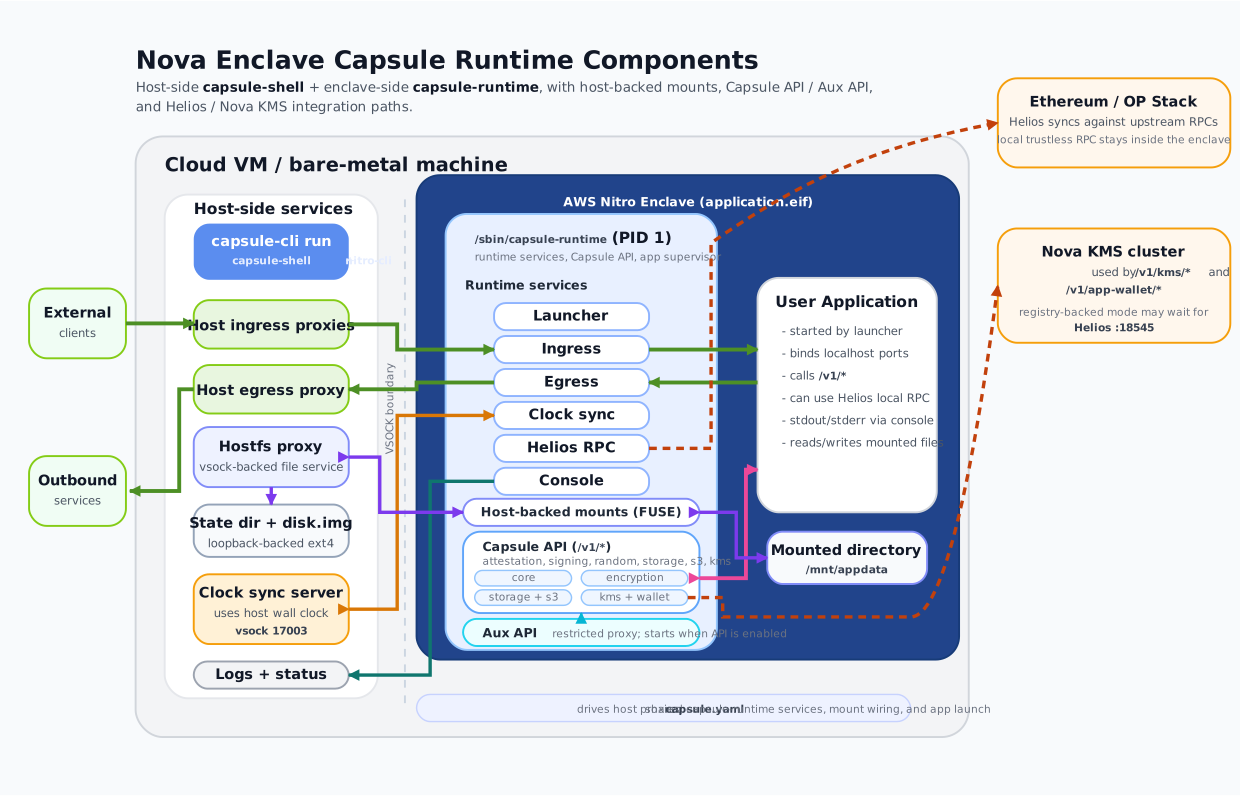
Host-side and enclave-side services, traffic paths, and integration points at a glance.
Build-Time Flow
capsule-cli build transforms your Docker app image into a self-contained enclave package.
Load capsule.yaml
Parse the manifest, resolve image references, and validate configuration.
Amend App Image
Inject /sbin/capsule-runtime binary and /etc/capsule/capsule.yaml configuration into the source application image.
Tag Intermediate
Tag the amended image as capsule-intermediate-<uuid>:latest for the EIF build step.
Build EIF
Run nitro-cli build-enclave inside an ephemeral Nitro CLI container to produce application.eif.
Package Capsule Shell
Append the EIF file and capsule manifest as new layers to the Capsule Shell base image. The result is the final release image.
Runtime Flow
When you run the capsule image, two execution domains start: the host side and the enclave side.
Host Side (Capsule Shell)
Start Host Proxies
Launch egress proxy, hostfs mount services, and clock-sync server on the host side of the vsock boundary.
Launch Enclave
Run nitro-cli run-enclave with the EIF, allocated CPU, and memory from the manifest or CLI flags.
Start Ingress Proxies
Open host-side TCP listeners for each configured ingress port and bridge traffic into the enclave over vsock.
Enclave Side (Capsule Runtime)
Bootstrap
Capsule Runtime starts as PID 1. Configures loopback networking and seeds RNG from the Nitro Secure Module (NSM).
Mount Host Directories
Connect to host-side hostfs proxies over vsock and FUSE-mount each declared directory.
Start Platform Services
In order: egress proxy → clock sync → Helios RPC → wait for Helios :18545 if KMS needs it → Capsule API + Aux API → ingress listeners.
Launch Application
Execute the user's original Docker entrypoint. All platform services are available on 127.0.0.1.
Core Components
Three binaries and a manifest power the entire flow.
capsule-cli
The developer-facing CLI. Handles build (image packaging) and run (enclave launch and supervision) commands.
Capsule Shell
The host-side container runtime. Starts proxies, launches the enclave via nitro-cli, and bridges traffic across vsock.
Capsule Runtime
Runs as PID 1 inside the enclave. Bootstraps the environment, starts all platform services, then launches your app.
capsule.yaml
Single manifest file that controls build-time image sources, runtime resources, networking, API, storage, and all service configuration.
Capsule API
HTTP API server on 127.0.0.1:18000 (default). Provides /v1/* endpoints for attestation, signing, encryption, S3, KMS, and wallet.
Aux API
Restricted proxy on port 18001 (default). Required for attestation flows — sanitizes the attestation document by removing the public key.
Traffic Paths
All communication between host and enclave passes through vsock channels over well-known ports.
Ingress
External → Host TCP → vsock → Enclave ingress listener → 127.0.0.1:app_port inside enclave.
Egress
Enclave app → 127.0.0.1:proxy_port (HTTP proxy) → vsock → Host egress proxy → Internet. Controlled by egress.allow/deny.
Clock Sync
Host time server → vsock → Enclave clock-sync client. Estimates RTT and offset, updates CLOCK_REALTIME.
Host Mounts
Enclave FUSE client → vsock → Host hostfs proxy → loopback ext4 image on parent instance disk.
VSOCK Port Scheme
17000 — app status stream | 17001 — app log stream
20000 + (CID × 128) + 0 — host egress proxy | + 1 — clock sync | + 16 + N — hostfs mount N
Enclave Process Model
Everything inside the enclave runs under Capsule Runtime (PID 1).
┌─ AWS Nitro Enclave ─────────────────────────────┐
│                                                  │
│  Capsule Runtime (PID 1)                         │
│  ├─ Ingress Proxy (TCP → vsock bridge)           │
│  ├─ Egress Proxy (HTTP proxy → vsock → host)     │
│  ├─ Clock Sync (periodic CLOCK_REALTIME update)  │
│  ├─ Helios RPC (trustless light client)          │
│  ├─ Console / Log Streaming (ring buffer)        │
│  ├─ Capsule API (/v1/*)                          │
│  │   ├─ Attestation                              │
│  │   ├─ Eth Signing                              │
│  │   ├─ Encryption (P-384 + AES-256-GCM)        │
│  │   ├─ Random (NSM-backed)                      │
│  │   ├─ S3 Storage                               │
│  │   ├─ Nova KMS                                 │
│  │   └─ App Wallet                               │
│  ├─ Aux API (restricted attestation proxy)       │
│  └─ Your Application                             │
│                                                  │
└──────────────────────────────────────────────────┘